
FASTMU - AUTO RESET
Helper Bot and Auto Reset — FastMU Guide
The FastMU Helper Bot automates movement, travel to hunting spots, character resets and point distribution. This guide explains how to activate it, use the automatic routes or configure up to four manual routes.
Helper Bot Guide Contents
Functions · Open the Bot · Auto Mode · Manual Routes · Route Example · Time and Online Rules
What Does the Helper Bot Do?
Helper Bot performs the main actions required for continuous leveling and resetting. It can follow routes supplied by the server or routes configured manually by the player.
| Function | What the Bot Does |
|---|---|
| Automatic Movement | Moves the character between the destinations defined in the active route. |
| Spot Travel | Automatically goes to the configured hunting coordinates. |
| Automatic Reset | Performs the reset after completing the configured leveling route. |
| Point Distribution | Distributes character points automatically. |
How to Activate and Configure Helper Bot
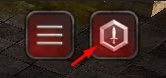
| Mouse Action | Result |
|---|---|
| Left-click | Turns Helper Bot on or off. |
| Right-click | Opens the Helper Bot configuration window. |
Automatic Routes and Auto Mode
Helper Bot starts configured in Auto mode. This mode uses routes already provided by the server and is the quickest way to begin. If an automatic spot is occupied, a manual route can be prepared with alternative maps and coordinates.
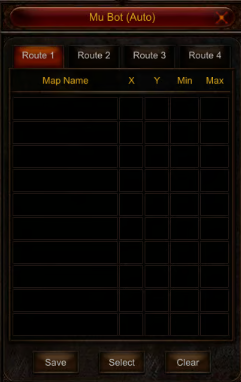
How to Configure Manual Routes
The configuration window provides Route 1, Route 2, Route 3 and Route 4. Different settings can be stored in each tab, but only the selected route operates at a time.
| Field or Control | Purpose |
|---|---|
| Map Name | Selects the map used for that stage of the route. |
| X and Y | Define the coordinates of the hunting spot. |
| Min | Defines the first character level for this route stage. |
| Max | Defines the final character level for this route stage. |
| Save | Saves the route settings. |
| Select | Selects the route that Helper Bot will use. |
| Clear | Clears the configured route entries. |
Helper Bot Route Configuration Example
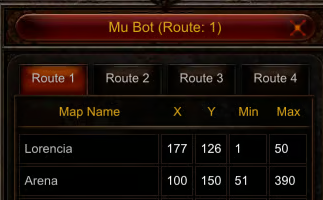
| Map | X | Y | Minimum Level | Maximum Level |
|---|---|---|---|---|
| Lorencia | 177 | 126 | 1 | 50 |
| Arena | 100 | 150 | 51 | 390 |
In this example, the character hunts in Lorencia through level 50. At level 51, Helper Bot moves to Arena and continues there through level 390 before performing the reset.
Six-Hour Limit and Online Requirement
| Rule | How It Works |
|---|---|
| Maximum Continuous Time | Helper Bot can remain active for a maximum of 6 consecutive hours. |
| Renewing the Time | Turning Helper Bot off and on renews its active time. Renew it within each six-hour period when you need to keep using it. |
| Connection Requirement | The character must remain online while Helper Bot is operating. |
| Offlevel | Helper Bot cannot be used in /offlevel. |
Helper Bot Quick Reference
Right-click the Helper Bot icon → choose Auto or configure Route 1–4 → enter the map, coordinates and level range → save and select one route → left-click the icon to activate it → renew the bot before its six-hour period ends while remaining online.