
FASTMU - Menu and Server Systems
Features Menu and Server Systems — FastMU Guide
The FastMU Features Menu provides quick access to the server's main systems through the three-bar button beside the Helper Bot icon. Move the cursor over the button to expand the menu, then select the feature you want to open.
Features Menu Guide Contents
Open the Menu · Feature Overview · Progression · Activities · Account and Items · Utilities
How to Open the FastMU Features Menu
Locate the button with three horizontal bars in the lower game interface. Move the mouse cursor over it and the complete Features Menu will expand automatically.
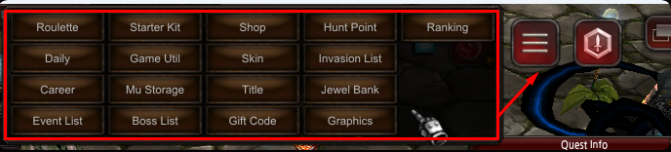
| Action | Result |
|---|---|
| Move cursor over the button | Expands the server Features Menu. |
| Move through the expanded menu | Allows you to review the available system buttons. |
| Click a feature | Opens the selected system window. |
Systems Available in the Features Menu
The expanded menu centralizes progression, activities, storage, server information and utility windows so they can be opened without searching through separate interface menus.
Character Progression Features
| Feature | Purpose |
|---|---|
| Starter Kit | Opens the server's starter kit system for new-character equipment. |
| Hunt Point | Opens the Hunt Point system and its available character information. |
| Career | Opens the character Career progression panel. |
| Title | Opens the character Title system. |
| Ranking | Displays the server ranking interface. |
| Skin | Opens the Skin system for the available character appearances. |
Activities and Server Information
| Feature | Purpose |
|---|---|
| Roulette | Opens the server Roulette system. |
| Daily | Opens the Daily system and its currently available activities. |
| Invasion List | Displays the invasion information available in the client. |
| Event List | Displays the server event list. |
| Boss List | Displays the server boss list and its available information. |
Items, Currency and Account Features
| Feature | Purpose |
|---|---|
| Shop | Opens the Shop available through the Features Menu. |
| MU Storage | Opens the server's MU Storage system. |
| Jewel Bank | Opens the Jewel Bank interface for supported jewels. |
| Gift Code | Opens the interface used to enter a valid gift code. |
Game Utilities and Graphics
| Feature | Purpose |
|---|---|
| Game Util | Opens GameUtils with the server's character, account, shop and utility tools. |
| Graphics | Opens the available graphics controls and visual settings. |
Features Menu Quick Reference
Move the cursor over the three-bar button → wait for the Features Menu to expand → choose a progression, activity, item or utility system → review the information inside its window → confirm actions only after checking the selected feature.